
TL;DR

Get art and craft supplies delivered free with Prime
- Fast, free delivery on millions of items
- Prime Video, Amazon Music and more included
- Member-only deals all year
In 2026, building your own AI workstation isn’t always cheaper anymore. Prebuilt systems often match or beat DIY costs when factoring in time, support, and thermal tuning, making them a smart choice for many. Your decision depends more on control and convenience than just price.
Imagine this: you’re ready to dive into AI, but the old advice—build it yourself for the best deal—no longer holds true. In 2026, the lines blur. Prices for GPU, RAM, and SSDs have surged, and prebuilt vendors have snapped up bulk discounts, making their systems competitive — sometimes even cheaper.
This changes the game. It’s no longer just about saving money. Now, your choice hinges on how much control you want, how fast you need to get started, and how much risk you’re willing to shoulder. Build vs Buy a Prebuilt AI Workstation. Ready to find out which path suits you best? Let’s break down the real tradeoffs, from cost and performance to support and customization.
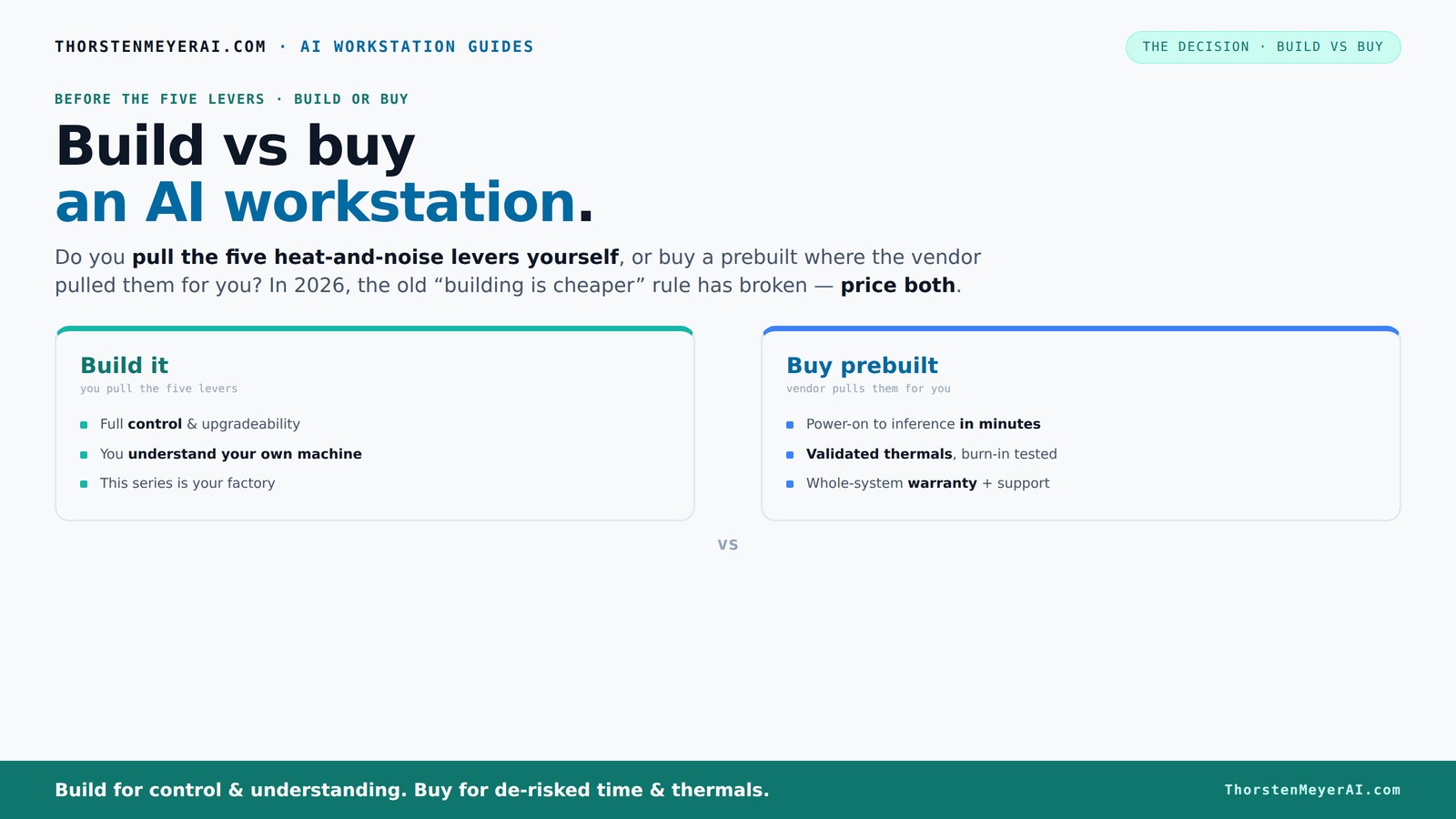
Build vs buy
an AI workstation.
The real question behind this whole series: do you pull the five heat-and-noise levers yourself, or buy a prebuilt where the vendor pulled them for you? And in 2026, the old “building is cheaper” rule has broken. Match your situation in Part 3.
Key Takeaways
- Component shortages in 2026 make prebuilt AI workstations often more cost-effective than DIY builds when considering total cost of ownership.
- Prebuilts come with validated thermals, support, and warranties—saving you time and reducing risk during heavy workloads.
- Building your own system offers maximum control over hardware, cooling, and upgrade paths, ideal for tinkering and customization.
- Long-term AI costs favor local workstations for frequent, intensive use, but cloud solutions suit sporadic or testing workloads.
- Your choice depends on balancing budget, control, time, and support needs—there’s no one-size-fits-all answer anymore.
As an affiliate, we earn on qualifying purchases.
Why Cost Isn’t the Whole Story in 2026: Price Comparison Revealed
Building your own AI workstation used to be the clear money-saver. Not anymore. The cost of high-end components like GPUs, DDR5 RAM, and NVMe SSDs has skyrocketed due to shortages and demand, often pushing DIY builds over $1,250. Meanwhile, prebuilt systems, bought in bulk by vendors, often come in at similar or even lower prices—sometimes under $1,200 for equivalent specs.
Here’s a quick comparison table:
| Feature | Build Your Own | Prebuilt System |
|---|---|---|
| Cost (average) | $1,250+ | $1,150–$1,250 |
| Component availability | Highly variable, often delayed | Ready-to-ship, bulk discounts applied |
| Support & warranty | Based on individual parts | Single vendor support, warranty included |
According to recent reports, the total cost of ownership often tilts toward prebuilts, especially when factoring in time spent troubleshooting and assembling. When you build your own, you're not just paying for parts—you’re investing your time, expertise, and patience. Mistakes, delays, or incompatible components can escalate costs and cause delays, especially if parts are out of stock or arrive late. Prebuilts, on the other hand, come pre-assembled and validated, saving you hours of setup and troubleshooting. This often translates into a more predictable investment, reducing unexpected expenses and downtime. Over the long run, the convenience and reliability of prebuilts can outweigh the initial cost savings of DIY, especially when factoring in the hidden costs of time and support. Learn more about crafting your ideal workstation.
As an affiliate, we earn on qualifying purchases.
Performance & AI Workload Fit: Which System Delivers the Best Results?
Performance isn’t just about raw specs anymore. It’s about how well the system handles sustained AI workloads. Prebuilts often come with validated thermals, optimized for heavy GPU use, reducing throttling and downtime. DIY builds, while customizable, require you to tune everything—fans, airflow, undervolting—to reach that same level.
Why does this matter? Because AI workloads are often long-running, compute-intensive tasks that generate significant heat. If your system’s thermals aren’t optimized, it can throttle performance to prevent overheating, leading to slower training times or even system crashes. Prebuilts designed with validated thermals have undergone rigorous testing, ensuring that they maintain peak performance over hours or days of continuous operation. This validation means less time spent tweaking and more time focused on your work. For example, a prebuilt with a well-validated thermal design can sustain GPU clocks 15-30% higher than an unoptimized DIY build under prolonged load, directly translating to faster AI training and inference times. In essence, thermal validation isn’t just about keeping systems cool; it’s about ensuring consistent, reliable performance during your most demanding tasks.
high performance prebuilt gaming PC
As an affiliate, we earn on qualifying purchases.
As an affiliate, we earn on qualifying purchases.
Support, Warranty, and Downtime: Why They Matter More Than Ever
When you’re running a deep-learning model, downtime costs money—sometimes thousands of dollars per hour if your models are in production. Prebuilt vendors usually include a warranty and offer quick support, which can be crucial when time is of the essence. If your GPU fails mid-training, a vendor-backed system often means faster repairs—sometimes on-site or with replacement parts shipped overnight—minimizing costly delays.
Building your own shifts that risk onto yourself. You rely on individual component warranties, which may vary in coverage and response times. Troubleshooting hardware issues can take days or even weeks, especially if you’re unfamiliar with diagnosing complex problems. This downtime can be expensive, especially if your AI projects are mission-critical or time-sensitive. For instance, some vendors like Lambda offer up to 5 years of support, including on-site repairs and thermal validation, which can be invaluable in a production setting. This level of support reduces the risk of unexpected failures causing costly delays, and provides peace of mind knowing that expert help is just a call away. For professionals and enterprises, support and warranty aren’t just convenience—they’re essential investments in uptime and productivity.
As an affiliate, we earn on qualifying purchases.
Customization & Upgrades: How Much Control Do You Really Need?
Building your own system means maximum control. You pick every part—GPU model, cooling method, case airflow, power supply—tailored to your specific workload. Want a quiet, water-cooled rig for 24/7 inference? You can do that. This flexibility allows you to optimize your system for noise, thermal performance, and future upgrades, ensuring your workstation evolves with your needs. You can choose high-quality components for better durability or experiment with different cooling solutions to improve thermal headroom, which is critical during prolonged AI training sessions.
Prebuilts are increasingly offering configurable options, but they often come with predefined cooling and hardware choices. Upgrading later may involve replacing entire components or even buying a new system. This can limit your ability to fine-tune the system as your workload or preferences change. For example, custom cases like those found on [6] allow you to optimize airflow, and you can swap in a quieter CPU cooler from [5] whenever needed. However, some vendors lock down upgrade paths to keep things simple, which can restrict future customization or expansion. The tradeoff is convenience versus flexibility—prebuilts save time but at the cost of some control, making them less adaptable for users who want to continually refine their hardware setup.
Cloud vs Local: Which AI Setup Saves You More Over Time?
Cloud GPU services are convenient—pay-as-you-go, no hardware headaches. But for heavy, frequent AI training, local workstations often come out ahead financially. According to [1], a dedicated local system can save thousands over a year compared to cloud costs, especially with ongoing projects that require repeated access to high-performance GPUs. The upfront investment might seem high, but when you amortize the cost over months or years of use, it often becomes more economical than continuous cloud billing. For example, running daily training sessions costing $5–$10 each in cloud fees quickly adds up, making a $1,200 system a cost-effective alternative over time. However, cloud solutions provide unmatched flexibility—they allow you to scale resources up or down based on project needs, without the upfront hardware investment. For sporadic or experimental workloads, this flexibility can be invaluable. Ultimately, the decision hinges on your workload volume, project frequency, and whether you value predictability and control or flexibility and scalability.
Understanding these tradeoffs helps you choose the most cost-effective setup aligned with your project demands—long-term local infrastructure or on-demand cloud resources.
Who Should Build and Who Should Buy? A User-Type Guide
If you love tinkering, have time, and want maximum control—building your own AI workstation makes sense. Hobbyists, students, and enthusiasts often get the best value by assembling their own rigs, referencing guides like [4] and [7]. This route allows you to customize every aspect, from component selection to cooling solutions, and to learn deeply about your hardware. However, it requires patience, technical skill, and a willingness to troubleshoot. For those who enjoy the process of building and refining their system, the benefits include tailored performance and upgradeability that can adapt to changing needs.
On the other hand, if you need quick setup, reliable support, and minimal hassle—buy a prebuilt. Professionals, small teams, or busy researchers benefit from vendors like Lambda or Puget, which validate thermals, provide comprehensive warranties, and handle support. This reduces downtime and lets you focus on your work rather than hardware issues. For example, a startup running AI models daily might prefer a prebuilt with a 3-year warranty and support package, ensuring maximum uptime. Conversely, a researcher experimenting with new configurations might prefer the control and flexibility of a DIY build, even if it requires more effort upfront. Your choice depends on your priorities: whether you value convenience and support or customization and control.
Frequently Asked Questions
Is it cheaper to build or buy a prebuilt AI workstation?
In 2026, component costs and bulk buying have made prebuilts often more competitive or even cheaper than DIY builds when you include support, assembly, and troubleshooting time. Always compare current prices for your specific configuration.How much does a prebuilt add in support and warranty costs?
Prebuilts typically include a warranty of 1–5 years and support services, which can save you days of troubleshooting and reduce downtime—costs hard to quantify but often worth the premium. This support can be critical during urgent projects or when reliability is paramount, as it ensures quick resolution of hardware issues and minimizes costly delays.Is a prebuilt workstation better for AI training than a DIY build?
Prebuilts usually come with validated thermals and optimized cooling for sustained workloads, making them more reliable for long AI training sessions. DIY can match performance but requires tuning and experience. The key is that prebuilt systems are tested for prolonged heavy use, reducing the risk of throttling or overheating that can slow training or cause crashes, which is especially important for time-sensitive projects.What do I gain by building my own AI workstation?
You get maximum control over hardware choices, cooling, noise levels, and upgrade paths. It’s ideal if you love tinkering or want a system tailored precisely to your workload. Building allows for customization that can optimize performance, thermal management, and future expandability, which can lead to better long-term value if you’re willing to invest the time and effort.What do I lose by buying prebuilt?
Prebuilts often have limited customization options and may be more expensive upfront. You trade off some control and future upgrade flexibility for convenience and support. Additionally, prebuilt systems might use proprietary components or configurations that restrict upgrades or modifications, which can be a disadvantage if you plan to evolve your system over several years.Conclusion
In 2026, the old rule—build cheaper, buy faster—no longer holds water. Prebuilt AI workstations can match or beat DIY costs when you factor in support, time, and thermal validation.
The real trick is understanding what matters most: instant deployment and support, or control and upgradeability. Choose the path that aligns with your project’s needs, and don’t forget—sometimes paying a bit more upfront saves endless headaches later.
Fall Picks
fall essentials
As an affiliate, we earn on qualifying purchases.