Craft cutting machines range from full-featured electronic cutters that handle fabric, leather, and balsa wood to compact vinyl cutters and manual die-cutting presses, and the right choice depends entirely on what you cut and how often. The Cricut Maker 4 earns my best overall pick for its unmatched material versatility and adaptive tool system, while the Brother ScanNCut SDX125E stands out for its built-in scanner that eliminates the need for design software, and the Cricut Joy Xtra wins for beginners and small workspaces. The main tradeoffs in this category come down to cutting width, material compatibility, and whether you want the control of software-driven cutting or the simplicity of manual dies. Cheaper vinyl-only cutters save money upfront but lock you into thin materials, while premium machines justify their cost only if you cut frequently and diversely. Keep reading for the full breakdown of all 13 machines and which one fits your craft setup.

Get art and craft supplies delivered free with Prime
- Fast, free delivery on millions of items
- Prime Video, Amazon Music and more included
- Member-only deals all year
Key Takeaways
- Material versatility separated the top tier: only the Cricut Maker 4 and the Brother ScanNCut models cut beyond vinyl and cardstock into fabric, felt, and thicker craft materials, which justified their premium positioning.
- A built-in scanner is the single biggest workflow differentiator — the Brother ScanNCut SDX125E and SDX125EGY let you cut hand-drawn or printed designs directly, while every other electronic option requires design software.
- Three of the thirteen products were variations of the Likcut S501, revealing that compact 4.5-inch vinyl cutters are a crowded, near-identical budget segment where bundled accessories and color options are the only real differences.
- Manual die cutters like the Sizzix Sidekick and the 9-inch adjustable-pressure press trade design freedom for zero learning curve and no software dependency, making them the safest pick for kids and occasional crafters.
- The Liene PixCut S1 carved out a unique niche by combining printing and cutting in one device — the only option here for full-color sticker production without a separate printer.
| Brother ScanNCut SDX125EGY Electronic Cutting Machine (Grey) |  | Best for Scanning and Fabric Work | Model: SDX125EGY | Display: 5-inch touchscreen LCD | Built-in Designs: 682 (including 100 quilting patterns) | VIEW LATEST PRICE | See Our Full Breakdown |
| VEVOR 12 in Vinyl Cutting Machine with Materials and Tool Kit |  | Best Value for Vinyl Projects | Cutting Width: 12 inches | Control: Button and screen controlled | Built-in Design Resources: 20,000+ | VIEW LATEST PRICE | See Our Full Breakdown |
| Likcut S501 Smart Vinyl Cutter, 4.5-Inch Cutting Width |  | Best for Small Sticker and Label Projects | Cutting Width: 4.5 inches | Connectivity: Bluetooth 5.0, USB 2.0 | Max Cutting Speed: 3.2 inches per second | VIEW LATEST PRICE | See Our Full Breakdown |
| Cricut Maker 4 Smart Cutting Machine with Digital Content Bundle (Seashell) |  | Best Overall for Versatility | Model: Cricut Maker 4 | Color: Seashell | Compatible Materials: 300+, including leather, wood, vinyl, iron-on HTV, cardstock, stickers | VIEW LATEST PRICE | See Our Full Breakdown |
| Sizzix Sidekick Starter Kit 661770 Portable Manual Die Cutting & Embossing Machine, White |  | Best Manual Option for Cardmakers | Model: 661770 | Brand: Sizzix (Ellison) | Opening Width: 2.5 inches (6.35 cm) | VIEW LATEST PRICE | See Our Full Breakdown |
| Likcut S501 Compact Vinyl Cutter Machine |  | Best Compact Pick | Brand: Likcut | Model: S501 | Cutting width: 4.5 in | VIEW LATEST PRICE | See Our Full Breakdown |
| Likcut S41 Vinyl Cutter Machine with Print-Then-Cut |  | Best for Print-Then-Cut Stickers | Brand: Likcut | Model: S41 | Cutting width: Up to 8.5 in | VIEW LATEST PRICE | See Our Full Breakdown |
| VEVOR 12 in Button-Controlled Vinyl Cutting Machine with 20000+ Built-in Design Resources | 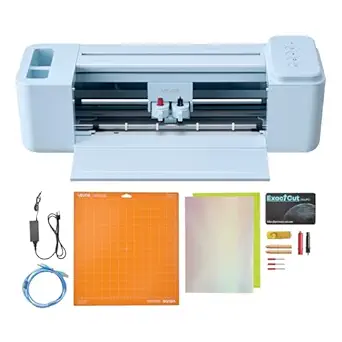 | Best Value for Wide-Format Versatility | Brand: VEVOR | Cutting width: 12 in | Functions: Cut, write/draw, score | VIEW LATEST PRICE | See Our Full Breakdown |
| Brother ScanNCut SDX125E Electronic Cutting Machine with Scanner |  | Best for Hand-Drawn and Scanned Designs | Model: SDX125E | Display: 5-inch touchscreen LCD | Built-in designs: 682 (including 100 quilting patterns) | VIEW LATEST PRICE | See Our Full Breakdown |
| Liene PixCut S1 Color Sticker Printer and Cutting Machine |  | Best All-in-One Sticker Maker | Printer type: Thermal dye sublimation | Print resolution: 300 dpi | Color depth: 24 bpp | VIEW LATEST PRICE | See Our Full Breakdown |
| 9-Inch Manual Die Cutting and Embossing Machine with Adjustable Pressure Dial and Starter Kit |  | Best for Manual Die Cutting | Platform width: 9 inches | Operation: Manual | Pressure control: Numbered adjustable dial | VIEW LATEST PRICE | See Our Full Breakdown |
| Likcut S501 Vinyl Cutter Machine, 4.5″ Sticker & Cardstock Cutting, Pink |  | Best Compact Cutter for Quick Designs | Cutting width: 4.5 inches | Size: A5 portable | Materials supported: 46+ materials, including vinyl, cardstock, iron-on transfers, and matless smart material | VIEW LATEST PRICE | See Our Full Breakdown |
| Cricut Joy Xtra Smart Cutting Machine with Digital Content Bundle | 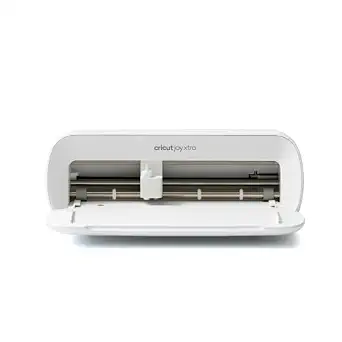 | Best Compact Machine for Printed Stickers | Compatible materials: 50+ materials, including vinyl, iron-on HTV, cardstock, and sticker materials | Functions: Cuts, writes, draws, and foils | Printer compatibility: Most inkjet printers | VIEW LATEST PRICE | See Our Full Breakdown |
| craft cutting machine | Connectivity | Functions |
|---|---|---|
| Brother ScanNCut SDX125EGY Ele | USB port, wireless | — |
| VEVOR 12 in Vinyl Cutting Mach | USB, Bluetooth, USB drive | Cut, write/draw, score |
| Likcut S501 Smart Vinyl Cutter | Bluetooth 5.0, USB 2.0 | Cutting and drawing |
| Cricut Maker 4 Smart Cutting M | — | Cut, draw, foil, score, engrave, deboss, perforate |
| Sizzix Sidekick Starter Kit 66 | — | — |
| Likcut S501 Compact Vinyl Cutt | Bluetooth 5.0, USB 2.0 | — |
| Likcut S41 Vinyl Cutter Machin | Wired and wireless | — |
| VEVOR 12 in Button-Controlled | USB, Bluetooth, USB drive | Cut, write/draw, score |
| Brother ScanNCut SDX125E Elect | USB port, wireless | — |
| Liene PixCut S1 Color Sticker | Bluetooth | Prints and cuts stickers, labels, photos, decals, phone skins |
| 9-Inch Manual Die Cutting and | — | — |
| Likcut S501 Vinyl Cutter Machi | Mobile, tablet, and PC | Cutting, drawing, and writing |
| Cricut Joy Xtra Smart Cutting | — | Cuts, writes, draws, and foils |
More Details on Our Top Picks
Brother ScanNCut SDX125EGY Electronic Cutting Machine (Grey)
This model stands apart from the field because of its built-in scanner, a feature no other machine in this lineup offers. Where the Cricut Maker 4 requires you to work through Design Space on a computer or phone, the ScanNCut lets you place a hand-drawn sketch or printed sticker directly on the mat, scan it, and cut it without ever opening design software. That workflow makes it the clear pick for quilters and fabric artists, especially with 100 dedicated quilting patterns built in. The auto blade’s material sensor removes the guesswork of manual depth settings, which is a genuine time-saver compared with the VEVOR 12-inch cutter‘s more hands-on approach. The tradeoff is that its 12 x 12-inch mat and 3mm cutting thickness limit it on thicker, denser materials, and the 120V US-only power restriction makes it a poor choice for international crafters.
Pros:- Built-in scanner enables direct cutting of printed designs and hand-drawn artwork without a computer
- Auto blade with material sensor eliminates manual blade-depth adjustments
- Whisper-quiet operation compared with most motorized cutters
- Generous bundle including 682 built-in designs, 100 quilting patterns, and accessories
Cons:- Test cuts are recommended before final projects, which slows down workflow
- US-only 120V operation voids the warranty if used elsewhere
Best for: Quilters, sewists, and paper crafters who want to scan and cut their own hand-drawn designs without relying on design software
Not ideal for: Anyone needing to cut very thick or dense materials beyond 3mm, or crafters outside the US given the 120V-only power requirement
- Model:SDX125EGY
- Display:5-inch touchscreen LCD
- Built-in Designs:682 (including 100 quilting patterns)
- Fonts:9
- Max Cutting Thickness:3 mm (0.1 inch)
- Connectivity:USB port, wireless
- Mat Size:12 x 12 inches
- Voltage:120V (US only)
Our verdict“This machine makes the most sense for fabric-focused and scan-to-cut workflows that digital-first machines like the Cricut Maker 4 simply can’t replicate.”
VEVOR 12 in Vinyl Cutting Machine with Materials and Tool Kit
For buyers who mainly want to cut vinyl and heat-transfer material without subscription fees, this option undercuts the pricier machines in this roundup on the things that matter most. Unlike the Cricut Maker 4, which gates its full 1.5 million-image library behind a paid Cricut Access plan, the VEVOR bundles its design software with 20,000+ built-in resources and no recurring costs. The 12-inch cutting width matches the Brother ScanNCut’s mat footprint, giving you full-size project capability at a lower ownership cost. Cutting, writing, and scoring functions cover the everyday needs of decal makers and small sign work. The compromises are real, though: the bundled software lacks the polish and advanced features of premium ecosystems, and there’s no scanner or material-sensing blade, so expect more manual setup and trial runs than the SDX125EGY demands.
Pros:- Included design software with no recurring subscription costs
- 20,000+ built-in design resources with ongoing updates
- Cuts, writes, and scores in one machine
- Broad compatibility across Mac, Windows, Android, and iOS with wired and wireless options
Cons:- 12-inch cutting width limits larger sign and banner projects
- Bundled software lacks the advanced features of premium competitor ecosystems
Best for: Budget-conscious vinyl and decal crafters who want full-size cutting capability and included software without subscription fees
Not ideal for: Crafters who want advanced software tools, thicker material support, or automated blade calibration
- Cutting Width:12 inches
- Control:Button and screen controlled
- Built-in Design Resources:20,000+
- File Formats:PNG, JPG, SVG, TIF
- Connectivity:USB, Bluetooth, USB drive
- Compatibility:Mac, Windows, Android 5.1+, iOS 11.0+
- Functions:Cut, write/draw, score
- Supported Materials:Vinyl, heat transfer paper, cardstock, foil, specialty paper
Our verdict“This pick makes the most sense for vinyl-first crafters who would rather spend money on materials than on software subscriptions.”
Likcut S501 Smart Vinyl Cutter, 4.5-Inch Cutting Width
This is the most specialized machine in the lineup, and its appeal depends entirely on what you make. The 4.5-inch cutting width sounds like a dealbreaker next to the 12-inch VEVOR, but for sticker sheets, labels, and small cardstock embellishments, that footprint is a feature rather than a flaw — it takes up far less desk space and suits short runs. Its 1 million+ design library and AI-assisted design tools go well beyond what the Brother ScanNCut offers natively, and the rated blade life of over 4,610 meters means blade replacement won’t be a frequent expense. Cutting speed of 3.2 inches per second is modest, so long production runs will test your patience. Compared with the Cricut Joy Xtra, another compact option in this roundup, the S501 leans harder into drawing capability and material variety rather than the Cricut ecosystem.
Pros:- Compact footprint fits small workspaces and craft corners
- Over 50 supported material types despite the small size
- Both cutting and drawing functions supported
- AI-assisted design features plus a library of over 1 million designs and 1,200+ fonts
Cons:- 4.5-inch cutting width restricts nearly all large-format projects
- 3.2 inches per second cutting speed is slow for batch production
Best for: Sticker and label makers, planners, and small-business sellers who produce compact die-cut designs in short runs
Not ideal for: Anyone making full-size decals, T-shirt designs, or 12-inch layouts — the 4.5-inch width can’t accommodate them
- Cutting Width:4.5 inches
- Connectivity:Bluetooth 5.0, USB 2.0
- Max Cutting Speed:3.2 inches per second
- Blade Life:Over 4,610 meters
- Design Library:Over 1 million designs, 1,200+ fonts
- Supported Material Types:Over 50
- Functions:Cutting and drawing
- Storage:Built-in front-cover storage
Our verdict“Buy it if your projects fit inside 4.5 inches; skip it if you ever plan to cut full-size vinyl or fabric.”
Cricut Maker 4 Smart Cutting Machine with Digital Content Bundle (Seashell)
If I were ranking raw capability across this entire roundup, the Maker 4 earns the top slot on breadth alone. With 300+ compatible materials including leather, balsa wood, and iron-on vinyl, it handles projects that the VEVOR or Likcut machines can’t attempt, and its seven functions — cutting, drawing, foiling, scoring, engraving, debossing, and perforating — turn it into a full workshop tool rather than a cutter. Compared with the Brother ScanNCut SDX125EGY, you give up the built-in scanner but gain far deeper material range and a more mature software ecosystem in Design Space. The bundled fine-point blade, mat, weeder, and materials sampler mean you can start a project the day it arrives. The honest drawback is the paywall: the free library of 3,000+ images is a fraction of the full catalog, and Cricut Access subscriptions add to long-term cost. Print-then-cut also assumes you already own an inkjet printer.
Pros:- Cuts 300+ materials from leather and wood to vinyl and cardstock
- Seven tool functions: cut, draw, foil, score, engrave, deboss, perforate
- Beginner-friendly Design Space software with a free library of 3,000+ images and 100+ fonts
- Bundle includes blade, mat, pen, weeder, and materials sampler to start immediately
Cons:- Full 1.5 million-image content library requires a paid Cricut Access subscription
- Print-then-cut workflows depend on a separate inkjet printer
Best for: Serious multi-material crafters who want one machine for leather, wood, vinyl, engraving, and debossing projects
Not ideal for: Crafters opposed to subscription ecosystems, or anyone without a separate inkjet printer for print-then-cut work
- Model:Cricut Maker 4
- Color:Seashell
- Compatible Materials:300+, including leather, wood, vinyl, iron-on HTV, cardstock, stickers
- Functions:Cut, draw, foil, score, engrave, deboss, perforate
- Software:Cricut Design Space
- Free Content Library:3,000+ images, 100+ fonts
- Print-Then-Cut:Compatible with most inkjet printers
- Includes:Fine-Point Blade, materials sampler, fine point pen, light grip mat, weeder, 30 bonus images
Our verdict“This is the machine to buy if you want maximum material range and tool functions in one device and accept the Cricut software ecosystem.”
Sizzix Sidekick Starter Kit 661770 Portable Manual Die Cutting & Embossing Machine, White
In a roundup dominated by electronic machines, this one earns its place by doing something none of them can: working without power, apps, or software at all. The Sidekick is a hand-cranked die cutter aimed squarely at cardmaking and scrapbooking, and the starter kit — six Framelits dies, two Thinlits dies, two embossing folders, and seven stamps — means it’s genuinely usable out of the box, unlike bare electronic machines such as the VEVOR that still assume you’ll source designs digitally. At 2 pounds with a vacuum-seal base, it’s the only truly portable option here, ideal for craft nights and travel. The limits are obvious when placed beside the Cricut Maker 4: a 2.5-inch opening, one sheet of lightweight cardstock at a time, and no ability to cut custom shapes beyond the dies you own. But for cardmakers who love physical dies and embossing texture, that simplicity is the whole point.
Pros:- Fully manual operation with no software, apps, or electricity needed
- Complete starter kit with dies, embossing folders, and stamps included
- Lightweight 2-pound design with vacuum-seal base for stable use anywhere
- Compatible with Sizzix Thinlits, Framelits, and some third-party dies
Cons:- 2.5-inch opening width restricts all projects to small sizes
- Cuts only a single sheet of lightweight cardstock at a time
- Custom shapes are limited to the physical dies you purchase
Best for: Cardmakers and scrapbookers who want a no-power, no-software die cutting and embossing tool for small projects and crafting on the go
Not ideal for: Crafters who want custom cut files, vinyl work, or anything wider than 2.5 inches — an electronic cutter like the Cricut Maker 4 is the better fit
- Model:661770
- Brand:Sizzix (Ellison)
- Opening Width:2.5 inches (6.35 cm)
- Dimensions:7.75 x 4.75 x 3.5 inches
- Weight:2 lbs (0.7 kg)
- Warranty:3-year limited
- Included Components:Machine, 6 Framelits dies, 2 Thinlits dies, 2 embossing folders, 7 stamps
Our verdict“The Sidekick is the right buy for traditional cardmakers who value portability and simplicity over the custom-cut flexibility of electronic machines.”
Likcut S501 Compact Vinyl Cutter Machine
The Likcut S501 stands out for buyers whose projects live in the small-format world — stickers, gift tags, cards, and labels. At a 4.5-inch cutting width, it takes up a fraction of the desk space that the VEVOR 12-inch cutter demands, and its front-cover tool storage means fewer lost weeding tools between sessions. Compared with the larger Likcut S41, this model trades cutting width for portability, which is a fair deal if you craft at a kitchen table or carry your machine to crops and classes. The million-design library and voice- or text-based design tools lower the learning curve for newcomers who don’t want to learn design software first. The catch is simple: any project wider than 4.5 inches is simply off the table, so T-shirt transfers and larger decals require a different machine.
Pros:- Highly compact and portable with built-in tool storage in the front cover
- Bluetooth 5.0 and USB 2.0 give flexible connection options
- Large design library with over one million designs and 1,000+ fonts
- Voice- and text-based design features help beginners start quickly
Cons:- Cutting width limited to 4.5 inches, ruling out most garment and large-decal work
- Small format means more mat repositioning for multi-piece projects
Best for: Beginners and casual crafters making small stickers, cards, and labels in tight workspaces
Not ideal for: Anyone planning T-shirt HTV or large decals — the 4.5-inch width caps project size hard
- Brand:Likcut
- Model:S501
- Cutting width:4.5 in
- Connectivity:Bluetooth 5.0, USB 2.0
- Design library:Over 1,000,000 designs and 1,000+ fonts
- Included components:Cutting machine, adapter, USB-C cable, vinyl bundle
Our verdict“This pick makes the most sense for small-project crafters who value desk-space savings and easy setup over cutting capacity.”
Likcut S41 Vinyl Cutter Machine with Print-Then-Cut
The Likcut S41 earns its spot by adding print-then-cut capability at an 8.5-inch width — the sweet spot for full-page sticker sheets. Compared with the smaller Likcut S501, it nearly doubles your cutting width while keeping the same app-driven, voice- and text-prompt design workflow, so it feels like the grown-up sibling rather than a different ecosystem. Its 0.2 mm accuracy tolerance matters here: precise contour cutting around printed artwork is where cheaper cutters fall apart. The onboard status screen and one-touch controls also remove guesswork that button-only machines like the standard VEVOR 12-inch can’t display. The tradeoffs are real, though — the AI-style design features depend entirely on the companion app, and Likcut doesn’t clearly document what’s in the bundled vinyl kit, so plan on buying your own materials to be safe.
Pros:- Print-then-cut support with 0.2 mm stated accuracy for clean contour cuts
- 8.5-inch width handles full-page sticker sheets unlike the smaller S501
- Onboard screen and one-touch controls show cutting status at a glance
- Both wired and wireless connections available
Cons:- Voice and text design features are locked behind the companion app
- Contents of the included vinyl bundle are not clearly specified
Best for: Sticker sellers and hobbyists who want print-then-cut precision on a budget
Not ideal for: Crafters who prefer standalone, offline operation — core design features require the app
- Brand:Likcut
- Model:S41
- Cutting width:Up to 8.5 in
- Accuracy tolerance:0.2 mm
- Connectivity:Wired and wireless
- Included components:Cutting machine, adapter, USB-C cable, vinyl bundle
Our verdict“A sensible middle ground for sticker makers who need print-then-cut precision without stepping up to a 12-inch machine.”
VEVOR 12 in Button-Controlled Vinyl Cutting Machine with 20000+ Built-in Design Resources
This VEVOR 12-inch cutter is the value play of this batch: full-width cutting, cut/write/score functionality, and a bundled software package with 20,000+ design resources and no recurring fees. That last point separates it from subscription-gated ecosystems — unlike the app-dependent Likcut S41, this machine reads SVG, PNG, JPG, and TIF files directly across Mac, Windows, Android, and iOS, plus USB-drive offline cutting. The three-way connectivity (USB, Bluetooth, flash drive) means you’re never stuck if Wi-Fi drops mid-project. What you give up versus the Brother ScanNCut SDX125E is intelligence: there’s no built-in scanner and no auto-sensing blade, so material settings are on you to dial in. And while 12 inches comfortably beats the S41’s 8.5, it still won’t cover banner-scale work, so large-format crafters should calibrate expectations before buying.
Pros:- No recurring software costs, with 20,000+ built-in designs and ongoing updates
- Cuts, writes, and scores in a single machine
- USB, Bluetooth, and USB-drive connectivity across all major platforms
- Handles vinyl, HTV, cardstock, foil, and specialty papers
Cons:- No built-in scanner or automatic material sensing, unlike the Brother SDX125E
- 12-inch width still limits larger signage or banner projects
Best for: Budget-conscious crafters who want maximum width and functionality without subscription costs
Not ideal for: Those who want guided, sensor-driven cutting — there’s no scanner or auto blade here
- Brand:VEVOR
- Cutting width:12 in
- Functions:Cut, write/draw, score
- Built-in design resources:20,000+
- Supported file formats:PNG, JPG, SVG, TIF
- Connectivity:USB, Bluetooth, USB drive
- Compatibility:Mac, Windows, Android 5.1+, iOS 11.0+
- Supported materials:Vinyl, heat transfer paper, cardstock, foil, specialty paper
Our verdict“The most machine per dollar in this batch for versatile home crafters who don’t need sensor automation.”
Brother ScanNCut SDX125E Electronic Cutting Machine with Scanner
The Brother ScanNCut SDX125E occupies a niche nobody else in this lineup touches: a built-in scanner that turns hand drawings, stamped images, or printed artwork directly into cut files — no computer or design software required. That workflow is a genuine advantage over the Likcut S41, whose print-then-cut still routes everything through its app. The auto blade detects material thickness automatically, so switching from vinyl to 3mm balsa wood or chipboard needs no manual depth guessing, something the VEVOR 12-inch can’t match. With 682 built-in designs (including 100 quilting patterns), it leans hard toward fabric and paper crafters. The drawbacks deserve attention: it’s a 120-volt US-only machine with a warranty that’s voided elsewhere, and Brother recommends trial cuts to verify results, which adds material waste and time for thicker media.
Pros:- Built-in scanner converts drawings and printed designs straight into cut files
- Auto blade senses material thickness, handling media up to 3mm including balsa and chipboard
- 682 built-in designs including 100 quilting patterns
- Wireless and USB connectivity with a 5-inch touchscreen
Cons:- US-only 120V operation with warranty voided in other regions
- Trial cuts recommended for thicker materials, wasting time and supplies
Best for: Quilters, fabric crafters, and artists who want to cut their own hand-drawn or printed designs without a computer
Not ideal for: International buyers — the 120-volt US-only design voids the warranty outside the United States
- Model:SDX125E
- Display:5-inch touchscreen LCD
- Built-in designs:682 (including 100 quilting patterns)
- Fonts:9 built-in
- Max cutting thickness:3 mm
- Mat size:12 x 12 in
- Connectivity:USB port, wireless
- Voltage:120 volts (US only)
Our verdict“The clear choice for quilters and hand-drawing artists whose workflow depends on scanning rather than downloading designs.”
Liene PixCut S1 Color Sticker Printer and Cutting Machine
The Liene PixCut S1 solves a two-device problem: it prints and cuts stickers in a single machine, using thermal dye-sublimation at 300 dpi and automatic lamination for water- and scratch-resistant results. Compared with the Likcut S41, which needs a separate printer for print-then-cut workflows, the PixCut collapses everything into one compact desktop unit — genuinely appealing for small-batch sticker sellers or planners who print on demand. Its AI-assisted image extraction simplifies cutting out photos and graphics, and the app’s free images, fonts, and templates carry no subscription, unlike some bigger-name ecosystems. But this specialization cuts both ways: this is a sticker machine, not a general cutter. It won’t handle HTV, cardstock, or fabric the way the VEVOR 12-inch or Brother SDX125E will, and Bluetooth-plus-app is mandatory for phone-based use, with no wired fallback listed for mobile devices.
Pros:- Prints and cuts in one device, eliminating a separate printer from the workflow
- Automatic lamination produces water- and scratch-resistant stickers
- AI-assisted image extraction simplifies contour cutting
- Free app content with no subscription required
Cons:- 300 dpi print resolution limits fine photographic detail
- Smartphone use requires the Liene app and Bluetooth only
- Cannot cut vinyl, HTV, or thicker craft materials like a general-purpose cutter
Best for: Small-batch sticker sellers and journal/planner crafters who want printed, laminated stickers in one step
Not ideal for: General crafters working with vinyl, HTV, or fabric — this is a sticker specialist only
- Printer type:Thermal dye sublimation
- Print resolution:300 dpi
- Color depth:24 bpp
- Ink colors:CMY
- Connectivity:Bluetooth
- Compatible devices:Laptops, smartphones, tablets (Android, iOS)
- Functions:Prints and cuts stickers, labels, photos, decals, phone skins
- Weight:6.2 lb
Our verdict“Buy it if printed stickers are your entire hobby; skip it if you need a do-everything cutting machine.”
9-Inch Manual Die Cutting and Embossing Machine with Adjustable Pressure Dial and Starter Kit
A 9-inch platform and adjustable pressure dial make this a practical choice for crafters who want hands-on cutting and embossing across A4 paper and larger materials. The numbered dial helps tailor pressure to different materials, while the included plates, folders, dies, and cardstock give a new owner supplies to start with. Compared with the compact Sizzix Sidekick, this machine accommodates wider projects and offers more room to work, though the Sidekick is easier to carry. Foldable platforms and a non-slip base help with storage and stability. The tradeoff is manual operation: each pass requires cranking, which can slow repeated or larger batches. The listing also omits the machine’s dimensions and weight, so planning a dedicated storage spot takes guesswork.
Pros:- 9-inch platform accommodates A4 paper and larger craft materials
- Numbered pressure dial adjusts for different materials
- Starter set includes cutting plates, folders, dies, stamps, cardstock, and tools
- Foldable platforms and non-slip base support storage and stable use
Cons:- Manual cranking takes more effort than an electronic cutter
- Dimensions and weight are not specified
- Die cutting depends on compatible physical dies rather than digital designs
Best for: Paper crafters who want to cut and emboss A4-sized projects by hand and value an included starter set
Not ideal for: Makers who need fast, repeated cuts or want precise size and weight information before choosing a storage location
- Platform width:9 inches
- Operation:Manual
- Pressure control:Numbered adjustable dial
- Rollers:Steel
- Housing:Reinforced ABS
- Platform design:Foldable side platforms
- Included accessories:Cutting plates, embossing folders, metal dies, clear stamps, cardstock, handle hardware, and assembly tools
Our verdict“Choose this machine for broad manual die cutting and embossing with starter supplies, provided you are comfortable cranking each pass.”
Likcut S501 Vinyl Cutter Machine, 4.5″ Sticker & Cardstock Cutting, Pink
Portable A5 sizing and voice or text-to-design tools give the Likcut S501 a distinct place among craft cutting machines: it is aimed at small vinyl, sticker, and cardstock jobs without a complex design setup. It supports more than 46 materials and connects to mobile devices, tablets, and PCs, so it can suit a maker who wants to work from different screens. Compared with the Cricut Joy Xtra, its 4.5-inch cutting width limits project size, and it lacks Print-Then-Cut. The Joy Xtra is a better fit for full-color printed stickers, while this Likcut emphasizes portability and AI-assisted design. Its pen adds drawing and writing options, but the narrow working area can make larger layouts awkward. The stated adult-use restriction also makes it a poor choice for unsupervised children.
Pros:- Compact A5 size is easy to transport and store
- Voice and text-to-design features reduce reliance on complex design software
- Supports more than 46 materials, including vinyl, cardstock, and iron-on transfers
- Connects to mobile, tablet, and PC devices and includes a drawing pen
Cons:- 4.5-inch cutting width constrains larger projects
- Does not support Print-Then-Cut
- Specified for adult use and not suitable for unsupervised children
Best for: Adult hobbyists making small vinyl labels, cards, and iron-on designs who want a portable cutter with simple design input
Not ideal for: Crafters producing wide decals or full-color printed stickers, since the cutting width is limited and Print-Then-Cut is unsupported
- Cutting width:4.5 inches
- Size:A5 portable
- Materials supported:46+ materials, including vinyl, cardstock, iron-on transfers, and matless smart material
- Connectivity:Mobile, tablet, and PC
- Design features:AI voice and text-to-design
- Functions:Cutting, drawing, and writing
- Included accessories:Pen, metal dies, and storage slot for weeding tools
- Color:Pink and white
Our verdict“Pick the Likcut S501 for small, portable cutting projects and AI-assisted design, but choose the Cricut Joy Xtra for printed stickers or wider work.”
Cricut Joy Xtra Smart Cutting Machine with Digital Content Bundle
Print-Then-Cut support sets the Cricut Joy Xtra apart from the smaller Likcut S501: pair it with a compatible inkjet printer to make full-color sticker designs, then use the cutter to shape them. It also cuts, writes, draws, and foils across more than 50 materials, giving paper crafters and small-business makers room to work across projects. The included blade, pen, weeder, practice materials, and 30 bonus images make it more ready to use than a bare machine. Compared with the larger Cricut Maker 4, the Joy Xtra favors a compact footprint over broader project capacity. That smaller format is useful for limited workspaces, but it can restrict the size of designs. Design Space is the required software, and some content carries an optional subscription; Print-Then-Cut also depends on having a compatible printer.
Pros:- Print-Then-Cut supports full-color stickers with a compatible inkjet printer
- Cuts, writes, draws, and foils on more than 50 materials
- Bundle includes a blade, pen, weeder, practice materials, and 30 bonus images
- Compact format suits smaller craft spaces
Cons:- Print-Then-Cut requires a compatible inkjet printer
- Some Design Space content requires an optional paid subscription
- Smaller format offers less room for large projects than the Cricut Maker 4
Best for: Sticker makers and paper crafters with a compatible inkjet printer who want a compact machine for color projects and varied materials
Not ideal for: Makers who need a wider work area, do not use Design Space, or lack a compatible inkjet printer for printed stickers
- Compatible materials:50+ materials, including vinyl, iron-on HTV, cardstock, and sticker materials
- Functions:Cuts, writes, draws, and foils
- Printer compatibility:Most inkjet printers
- Software:Cricut Design Space
- Included components:Fine-Point Blade, Fine Point Pen, Mini Weeder, welcome card, USB cable, power adapter, and practice-cut materials
- Digital content:30 bonus images
- Warranty:1-year manufacturer warranty
Our verdict“Choose the Joy Xtra if compact size and printed sticker cutting matter more than the larger project capacity of the Cricut Maker 4.”

How We Picked
I ranked these 13 craft cutting machines around four buyer-relevant criteria: material range, ease of use, workspace demands, and long-term value. Material range carried the most weight because it defines what projects are even possible — a machine limited to vinyl and sticker paper serves very different buyers than one that cuts fabric and wood. Ease of use covered software requirements, learning curve, and whether the machine works standalone, which matters enormously for beginners and anyone who dislikes subscription-based design platforms. Workspace and portability factored in for crafters with dedicated rooms versus kitchen-table setups.
Long-term value tied everything together: I weighed not just what each machine costs relative to its capabilities, but accessory ecosystems, blade and mat replacement costs, and whether bundled kits genuinely reduce the extras a new crafter must buy. Machines that locked buyers into narrow workflows ranked lower unless they excelled within that niche. That logic placed the versatile Cricut Maker 4 at the top, scanner-equipped Brother models close behind, compact electronic cutters in the middle tier for hobbyists, and manual die cutters at the value end for specific use cases rather than general crafting.
| craft cutting machine | Connectivity | Functions |
|---|---|---|
| Brother ScanNCut SDX125EGY Ele | USB port, wireless | — |
| VEVOR 12 in Vinyl Cutting Mach | USB, Bluetooth, USB drive | Cut, write/draw, score |
| Likcut S501 Smart Vinyl Cutter | Bluetooth 5.0, USB 2.0 | Cutting and drawing |
| Cricut Maker 4 Smart Cutting M | — | Cut, draw, foil, score, engrave, deboss, perforate |
| Sizzix Sidekick Starter Kit 66 | — | — |
| Likcut S501 Compact Vinyl Cutt | Bluetooth 5.0, USB 2.0 | — |
| Likcut S41 Vinyl Cutter Machin | Wired and wireless | — |
| VEVOR 12 in Button-Controlled | USB, Bluetooth, USB drive | Cut, write/draw, score |
| Brother ScanNCut SDX125E Elect | USB port, wireless | — |
| Liene PixCut S1 Color Sticker | Bluetooth | Prints and cuts stickers, labels, photos, decals, phone skins |
| 9-Inch Manual Die Cutting and | — | — |
| Likcut S501 Vinyl Cutter Machi | Mobile, tablet, and PC | Cutting, drawing, and writing |
| Cricut Joy Xtra Smart Cutting | — | Cuts, writes, draws, and foils |
Factors to Consider When Choosing Craft Cutting Machines
Before committing to a craft cutting machine, it helps to understand the broader landscape and the mistakes that lead to buyer’s remorse. These are the factors I would weigh before spending anything.Cutting Width vs. Actual Project Size
The advertised cutting width is often misleading because it describes the maximum material width, not the maximum cut length, and some compact machines limit single cuts far more than buyers expect. A 4.5-inch cutter like the Likcut S501 handles stickers and cards beautifully but fails the moment you want a full-width T-shirt transfer or a large wall decal. A 12-inch platform, found on the VEVOR models and both Brother ScanNCuts, covers the majority of crafting projects. The mistake I see most often is buying small for the workspace and regretting it at the first oversized project — go one size larger than your current needs if budget allows.Software Ecosystems and Hidden Costs
Electronic cutters are only as good as the software that drives them, and this is where long-term costs hide. Some platforms push subscription plans for access to design libraries, while others work with free desktop or mobile apps that may have steeper learning curves but no recurring fees. The Brother ScanNCut line sidesteps much of this with its built-in scanner and on-device design library, while Cricut’s ecosystem is polished but increasingly subscription-driven. Before buying, check whether the machine supports importing your own SVG files for free — this single feature can save hundreds over the machine’s life.Manual vs. Electronic: Matching the Machine to the Crafter
Manual die cutters like the Sizzix Sidekick and the 9-inch adjustable-pressure press are often dismissed as beginner toys, but they suit a genuinely different workflow. They need no power, no software updates, no WiFi, and no troubleshooting — you place a die and crank. That makes them ideal for classrooms, kids’ crafts, and travel, and adjustable pressure models handle embossing that electronic cutters cannot. The tradeoff is total design dependence on physical dies, which add up in cost and storage space. If you cut the same shapes repeatedly, manual wins; if you want custom designs, electronic is the only path.Material Compatibility and Blade Systems
Material range is where budget and premium machines diverge sharply. Vinyl-only cutters like the Likcut and VEVOR lines use drag blades that struggle with anything fibrous or thick. Machines with adaptive or motorized tool systems — the Cricut Maker 4 being the strongest example — can switch between knife blades, rotary blades, and scoring tools to cut fabric without backing, leather, and balsa wood. Be honest about your material ambitions: if you see quilting or woodworking in your future, a cheaper cutter becomes a sunk cost. If vinyl decals and stickers are the whole plan, paying for a premium tool system wastes money.Bundles, Starter Kits, and What You Actually Need
Several machines on this list ship with digital content bundles or physical starter kits, and the value of these varies wildly. A tool kit and practice vinyl, like the VEVOR bundles include, genuinely shorten the time to first successful project. Digital content bundles look generous on paper but often duplicate free designs or assume you’ll stay inside that brand’s subscription. A common mistake is paying more for a bundle when you already own mats and blades from a previous machine, or the opposite — buying a bare machine and discovering that mats, blades, and weeding tools add a surprising amount to the real cost of getting started.Print-Then-Cut and Specialized Workflows
Some cutting workflows deserve dedicated hardware, and sticker makers are the clearest example. Machines like the Liene PixCut S1 combine color printing and contour cutting in one unit, which a standard cutter paired with an inkjet can replicate only with alignment headaches and wasted material. Similarly, print-then-cut capable vinyl cutters like the Likcut S41 handle registration-mark detection that basic models lack. If your crafting centers on a single repeated output — stickers, decals, cards — buying a specialist often beats a generalist. If your projects vary week to week, versatility should win over specialization every time.Frequently Asked Questions
Do I need a Cricut-style subscription to use an electronic craft cutting machine?
No, and this is one of the most common misconceptions in the category. Subscription plans on major platforms unlock curated design libraries and fonts, but every machine in this roundup can cut designs you create yourself or import as standard file types like SVG. The Brother ScanNCut models are especially subscription-resistant because their built-in scanner and on-board design library let you work almost entirely off the device itself. The real question is how much you value ready-made designs versus building your own. If you design your own files, ignore the subscription marketing entirely; if you want endless ready-to-cut projects, factor a subscription into the total cost of ownership before comparing prices between brands.
Is a small cutter like the Likcut S501 enough, or should I spend more for a 12-inch machine?
That depends entirely on your projects, not your skill level. A 4.5-inch cutting width covers stickers, labels, cardstock accents, and small decals — which is a huge share of casual crafting. It fails for T-shirt transfers in adult sizes, large wall decals, tote bag designs, and most garment vinyl work, where 12 inches is the practical minimum. The pattern I noticed across this roundup is that small cutters get returned not because they perform poorly but because buyers underestimate how quickly project ambitions grow. If there is any chance you will want full-width heat transfers or home decor vinyl within a year, the 12-inch platform pays for itself the first time it saves you from outsourcing a project.
Can a manual die cutting machine replace an electronic cutter?
For some crafters, yes completely — but only within a fixed set of shapes. Manual machines like the Sizzix Sidekick and adjustable-pressure 9-inch presses excel at repeated shapes, embossing folders, and kid-friendly crafting with zero software or power requirements. What they cannot do is cut a custom design, a downloaded font, or anything you have not purchased a physical die for. Over time, dies become both a cost and a storage problem, and intricate custom work is simply impossible. I would recommend manual for scrapbookers, card makers, and teachers who work with established shape libraries, and electronic for anyone whose designs originate on a screen.
What is the difference between the Brother ScanNCut SDX125E and SDX125EGY?
Functionally these are the same machine, and that is why they appear separately in this roundup — buyers routinely overpay for the difference without realizing it. The core cutting platform, built-in scanner, and material handling are identical between the two. The variations come down to the bundled accessories and digital content included in the box, which shifts the value equation rather than the capability. If one ships with mats, blades, or starter materials you would otherwise buy separately, that bundle may justify a price gap. My advice is to compare the two on the total cost of the bundle contents versus buying those accessories individually, and choose whichever combination leaves you with less duplicated gear.
Do I need a separate printer for print-then-cut projects?
Usually yes, with one exception in this lineup. Standard workflow requires printing your design on an inkjet or laser printer, then loading the printed sheet into your cutter, which reads registration marks to align the cuts around your artwork. That works well but introduces alignment tolerance issues, wasted sheets, and a two-device workflow. The Liene PixCut S1 eliminates the problem entirely by printing and cutting in one device, which is why it dominates for sticker production despite being a specialist. The Likcut S41 handles print-then-cut detection well for a budget vinyl cutter if you already own a decent printer. Choose based on volume: occasional print-then-cut projects suit the two-device approach, while frequent sticker production justifies the all-in-one.
Conclusion
Mapping these 13 machines to buyer types closes the decision cleanly. For the best overall pick, the Cricut Maker 4 stands out for crafters who want one machine that handles everything from vinyl to fabric to balsa wood without compromise. The best value goes to the VEVOR 12-inch vinyl cutters, which deliver a full-size cutting platform and bundled accessories at a price that leaves room for materials. For beginners, the Cricut Joy Xtra makes the most sense — its guided setup and compact footprint remove the two biggest barriers to starting, while the Sizzix Sidekick serves absolute beginners and kids who want zero software involvement.
On the premium side, the Brother ScanNCut SDX125E justifies its position for anyone who wants to cut hand-drawn or printed artwork without wrestling with design software — its scanner changes the entire workflow. For specific needs: the Liene PixCut S1 is the clear choice for sticker makers who want print and cut in one device, the Likcut S501 family covers small-space vinyl and cardstock work on a tight budget, and the 9-inch manual press suits embossing-focused crafters and classrooms. Whatever your pick, match the machine to the projects you will actually make this year — not the ones you imagine — and you will avoid the most common regret in this category.
Halloween Picks
halloween
As an affiliate, we earn on qualifying purchases.