
To improve accessibility in UX writing, focus on crafting descriptive alt text for images and icons that clearly explain their purpose, helping users understand visual content even without seeing it. Use captions to clarify complex visuals and include explicit labels for color cues, ensuring everyone can grasp the information. Clear, concise descriptions enable users with varying abilities to navigate easily. Keep exploring ways to make your content more inclusive—there’s more to learn that can truly enhance the user experience.
Key Takeaways
- Use descriptive, specific alt text to convey the content and function of images for screen readers.
- Ensure captions provide context and clarify complex visuals or data for all users.
- Avoid redundancy; alt text should be concise yet informative without repeating visual details.
- Include captions that complement images, enhancing understanding for users with visual impairments.
- Follow accessibility guidelines to create consistent, meaningful alt text and captions that improve overall usability.

Accessibility in UX writing is fundamental because clear, inclusive language guarantees that all users can understand and navigate digital products effortlessly. When crafting content, you need to consider how users with varying abilities interact with your interface. Voice commands play a pivotal role here, as many users rely on them to control devices or access information. To guarantee voice commands work smoothly, your labels and prompts must be straightforward and unambiguous. For example, instead of vague instructions like “Press this,” opt for clear directives such as “Say ‘Open settings.'” This clarity helps voice recognition systems interpret user input accurately, making your product more accessible.
Clear, unambiguous labels and prompts enhance voice command accessibility and user understanding.
Color contrast is another critical aspect of accessible UX writing. When designing text and background combinations, you must guarantee sufficient contrast to accommodate users with visual impairments or color vision deficiencies. Low contrast makes it difficult for some users to read your content, leading to frustration and confusion. Use tools to evaluate color contrast ratios, aiming for standards recommended by accessibility guidelines. Clear, high-contrast text not only benefits users with disabilities but also improves overall readability for everyone, especially in bright environments or on small screens.
In your writing, avoid relying solely on color cues to convey information. Instead, include descriptive text that communicates the message effectively, regardless of the user’s ability to perceive color differences. For example, if you use red to indicate errors, accompany it with explicit labels like “Error: Invalid input” instead of just changing the text color. This approach ensures that users who can’t distinguish colors still receive the necessary information. When writing alt text and captions, be precise and descriptive, providing context that helps users understand images, icons, and visual cues without seeing them. Alt text should convey the content and function of images, while captions can clarify complex visuals or data. Additionally, incorporating filtration technologies into your understanding of air purifiers can help inform inclusive content about their features and benefits.
Ultimately, integrating considerations like voice commands and color contrast into your UX writing creates a more inclusive experience. When you write with accessibility in mind, you’re not just complying with standards—you’re making your digital products usable and welcoming to everyone, regardless of their abilities. Clear, thoughtful language breaks down barriers, allowing all users to engage fully and confidently with your content.
accessible screen reader alt text tools
As an affiliate, we earn on qualifying purchases.
As an affiliate, we earn on qualifying purchases.
Frequently Asked Questions
How Do I Write Effective Alt Text for Complex Images?
To write effective alt text for complex images, focus on descriptive language that captures the essential details needed for understanding. Consider the visual storytelling behind the image and highlight key elements that convey its purpose. Be concise but thorough, ensuring that users relying on screen readers receive enough context. Avoid unnecessary words, and prioritize clarity to make the image’s message accessible to everyone.
What Are Common Mistakes to Avoid in Captions?
You should avoid vague or overly detailed captions that confuse users. Make sure your image descriptions are concise and relevant, providing clear caption clarity. Don’t rely on context alone; explicitly describe what’s important in the image. Steer clear of jargon or assumptions about what users already know. Instead, make your captions informative and straightforward, helping all users understand the content without frustration or ambiguity.
How Can I Test the Accessibility of My UX Content?
Did you know that 15% of the global population experiences some form of disability? To test your UX content’s accessibility, use assistive technology like screen readers to see how it performs. Gather user feedback from diverse users, including those with disabilities, to identify issues. Regular testing guarantees your content remains inclusive, helping you create a seamless experience for all users.
Are There Tools to Generate Alt Text Automatically?
Yes, AI tools can generate alt text automatically, which saves you time and effort. You can explore options like Microsoft’s Azure Cognitive Services or Google’s Cloud Vision API to help create descriptive alt text for images. However, it’s important to combine AI-generated suggestions with manual techniques, ensuring the descriptions are accurate and meaningful. Always review and refine the automatically generated alt text to meet accessibility standards and truly support all users.
How Does Accessibility Impact Overall User Engagement?
Accessibility acts like a bridge that connects you with a wider audience, boosting overall user engagement. When you practice inclusive design and show genuine user empathy, more people feel valued and understood, encouraging them to stay longer and interact more. By making your content accessible, you turn your platform into a welcoming space, increasing engagement and loyalty. It’s not just good ethics—it’s smart strategy for expanding your reach.
captioning software for visually impaired
As an affiliate, we earn on qualifying purchases.
As an affiliate, we earn on qualifying purchases.
Conclusion
By prioritizing accessibility in your UX writing—like crafting clear alt text and captions—you make your content inclusive for everyone. Imagine a visually impaired user steering your website smoothly because your alt texts describe images accurately, or a deaf user understanding videos through captions. When you implement these simple yet powerful elements, you create a more welcoming experience. Accessibility isn’t an afterthought; it’s essential to reaching all users and making your digital space truly open.

Handheld Color Analyzer Digital Precise Colorimeter WR10QC Precision Color Difference Meter Tester Portable Colorimeter with 4mm Aperture for Color Checking
· Hand-held colorimeter WR10QC is the high-precision basic version colorimeter, serially developed according to the measuring requirements on…
As an affiliate, we earn on qualifying purchases.
As an affiliate, we earn on qualifying purchases.
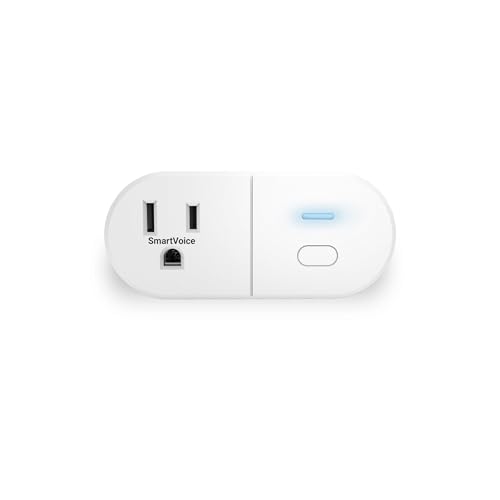
Emerson SmartVoice ES513 Wall Plug, Offline 30+ Voice Control Commands – No APP, No WiFi, No Setup, Smart Outlet Extender for Home and Office, Sleep & Wake Timer, ETL Listed
🔊 100% Offline Voice Control – Control any plugged-in device with simple voice commands using built-in SmartVoice Technology….
As an affiliate, we earn on qualifying purchases.
As an affiliate, we earn on qualifying purchases.